Hawa Code supports automatic context editing. When the context window utilization is relatively high, it automatically edits the context content by replacing large content with placeholders, and can restore the original content when needed.
How to Use
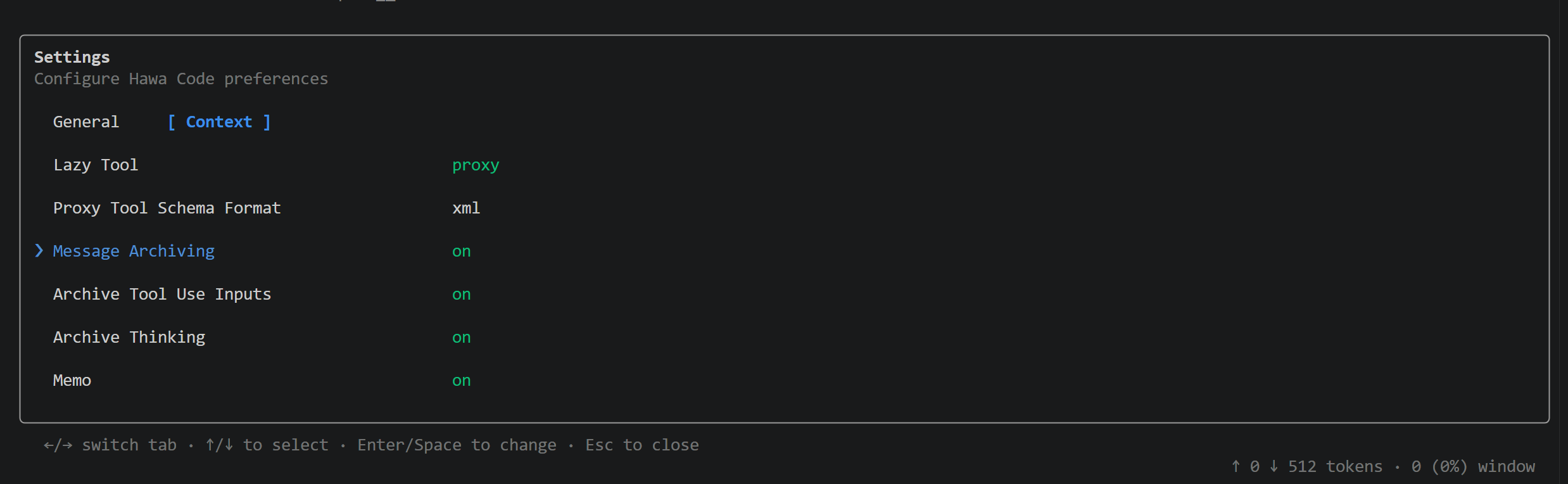
The /config slash command can be used to configure context editing:
- Message Archiving: enable or disable context editing
- Archive Tool Use Inputs: enable or disable editing of Tool Use inputs
- Archive Thinking: enable or disable editing of Thinking content
Core Benefits
Context editing allows Hawa Code to run longer and more complex tasks within a limited context size. Since large context content is replaced with placeholders, it can also save tokens to a greater extent.
Model-Initiated Operations
Context editing in Hawa Code mainly supports two operations:
- Archive: replace the specified context content with a placeholder. Thinking content cannot be archived — once archived, it is deleted.
- Unarchive: restore content that has been archived as a placeholder back to its original content.
Hawa Code embraces the philosophy that models are getting “smarter”, so archiving operations are performed directly by the model in the main loop, rather than being delegated to another model running in the background. This better ensures task continuity — the model does not feel that content has been lost, and it is fully aware of what has been archived, which improves archiving accuracy without affecting the current task execution.
Hawa Code still retains the context compression mechanism: when the context size exceeds a threshold, it is automatically compressed. This action is performed passively. Context compression serves more as a safeguard; long-running tasks can rely more on the context editing mechanism.
Archivable Content
Hawa Code can archive the following content:
- tool use input: handles the inputs of tool calls, mainly for tools like Write whose inputs can be very long text.
- tool result: handles the results of tool calls, mainly for tools like Read whose results can be very large content.
- thinking: handles outdated thinking content.
Hawa Code can archive and unarchive any tool, including MCP tools.
Cost Optimization
Modifying the context invalidates the Prompt Cache prefix. If small content is archived at high frequency, the benefit diminishes. Hawa Code applies the following optimizations:
- Archive in batches instead of archiving the same batch of content in multiple passes. Ideally, a single archive reduces context size utilization by 10 ~ 20 percentage points.
- Hawa Code intelligently suppresses archiving operations to reduce consecutive archiving.
- As the context size grows, Hawa Code gradually increases its awareness of context archiving.
Example
The following is an archiving example, including Tool Use, Tool Result, and thinking content. When archiving, a summary is generated at the same time, and these summaries serve as the main basis for unarchiving.

The following is the placeholder structure of the archived content:
{ |